
How to Sync WhatsApp Conversations With Zendesk CRM for Better Customer Context in 2026 | Whatsboost
Learn how to sync WhatsApp conversations with Zendesk CRM for better customer context in 2026. Discover the step-by-step setup, practical workflows, key benefits, and how Whatsboost powers seamless WhatsApp and Zendesk integration for support and sales teams.
Picture this: a customer contacts your support team on WhatsApp — frustrated, having already explained their issue twice before. The agent who picks up has no record of previous conversations. They ask the customer to start from the beginning. The customer's frustration doubles. The interaction ends badly, and a loyal customer considers switching to a competitor.
This scenario plays out thousands of times every day across Indian businesses that use WhatsApp for customer communication but have not connected it to their Zendesk CRM. The conversations are happening — but the context is not being captured where support and sales teams can access it.
In 2026, syncing WhatsApp conversations with Zendesk CRM is one of the most impactful improvements a customer-facing team can make. It creates a complete, unified view of every customer interaction across every channel — so no agent ever has to ask a customer to repeat themselves again.
This blog explains exactly how to achieve this sync, why it matters, and how Whatsboost makes it work reliably for Indian businesses.
Why Syncing WhatsApp With Zendesk Transforms Customer Experience
Zendesk is purpose-built for customer context. It centralises tickets, customer history, interaction logs, and agent notes in one place — so every team member sees the same complete picture of the customer relationship. But Zendesk is only as complete as the data fed into it.
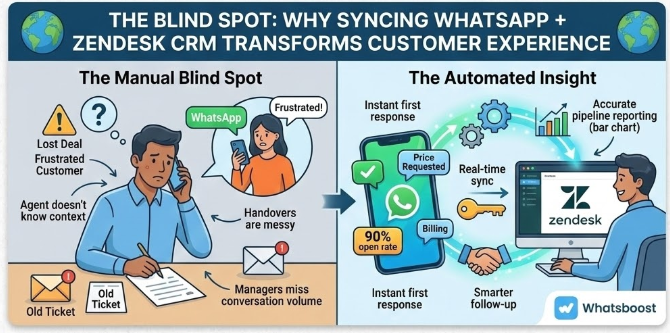
For Indian businesses where WhatsApp is the primary customer communication channel, conversations that stay in WhatsApp and never reach Zendesk create a dangerous blind spot. Support agents make decisions without knowing what was promised on WhatsApp last week. Sales reps follow up without knowing a customer raised a complaint on WhatsApp yesterday. Managers review Zendesk reports that completely miss the communication volume happening on WhatsApp daily.
Syncing WhatsApp conversations with Zendesk fills this blind spot — giving every agent, rep, and manager the complete customer context they need to deliver genuinely excellent experiences.
Whatsboost provides the WhatsApp Business API infrastructure and webhook capabilities that make this sync possible, fast, and reliable for Indian businesses at every scale. Learn more at Whatsboost.in.
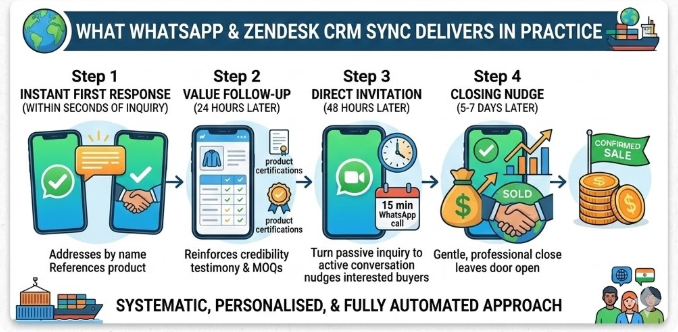
What WhatsApp and Zendesk Sync Delivers in Practice
When WhatsApp conversations are synced automatically with Zendesk through Whatsboost, here is what changes for your team:
Every WhatsApp message becomes a Zendesk ticket or note — Inbound customer messages on WhatsApp can automatically create new Zendesk tickets or be appended to existing ones — ensuring no conversation falls outside the CRM record.
Customer history is always visible in Zendesk — Support agents viewing a Zendesk customer profile see the complete interaction timeline — including WhatsApp exchanges — before responding, enabling genuinely contextual, personalised support.
Cross-channel conversations are unified — A customer who has previously contacted you by email, phone, and WhatsApp has all three channels reflected in a single Zendesk record — eliminating the channel silos that cause frustration for customers and agents alike.
Automated ticket creation reduces agent workload — Instead of manually logging WhatsApp interactions in Zendesk, agents focus on resolving issues while the sync handles documentation automatically.
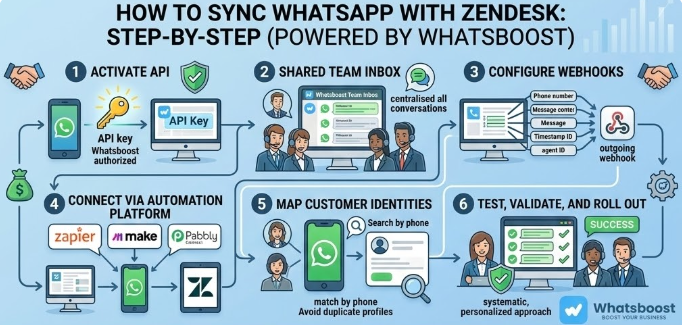
How to Sync WhatsApp Conversations With Zendesk: Step-by-Step
Step 1: Activate WhatsApp Business API via Whatsboost
The WhatsApp Business API is the essential foundation. Whatsboost is an authorised WhatsApp Business Solution Provider that activates your API quickly with guided onboarding. Once live, your WhatsApp number can send and receive messages programmatically — making sync with Zendesk possible. Visit Whatsboost.in to get started.
Step 2: Set Up Whatsboost Shared Team Inbox
Move your customer-facing WhatsApp communication to Whatsboost's shared team inbox. This centralises all agent interactions in one platform — from every team member, across every conversation — and makes automated capture and sync achievable at the team level rather than from individual devices.
Step 3: Configure Whatsboost Webhooks
Enable outgoing webhooks in Whatsboost that fire on every inbound and outbound WhatsApp message. The webhook payload should include the customer's phone number, message content, timestamp, agent identifier, and any labels applied to the conversation.
Step 4: Connect to Zendesk via Automation Platform
Use Zapier, Make, or Pabbly Connect to receive Whatsboost webhooks and take action in Zendesk. Common configurations include:
- Create a new Zendesk ticket when a new WhatsApp conversation starts from an unrecognised number
- Add a note to an existing Zendesk ticket when a message is received from a known customer
- Update a Zendesk customer profile with the WhatsApp message content and timestamp
- Trigger a Zendesk workflow based on the content or label of the WhatsApp message
Step 5: Map Customer Identities Between Platforms
For the sync to work accurately, WhatsApp phone numbers need to match customer records in Zendesk. Configure your automation to search Zendesk for an existing customer by phone number before creating a new record — avoiding duplicate profiles and ensuring all WhatsApp messages are logged against the correct customer history.
Step 6: Test, Validate, and Roll Out
Send test messages through Whatsboost and confirm they appear correctly in Zendesk — as tickets, notes, or profile updates as configured. Validate the identity matching, confirm timestamps are accurate, and test edge cases before rolling out the sync to your full support or sales team.
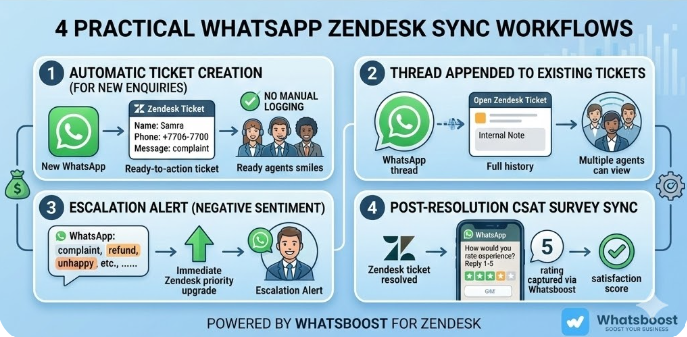
4 Practical WhatsApp Zendesk Sync Workflows
1. Automatic Ticket Creation for New WhatsApp Enquiries
When a customer messages your WhatsApp for the first time, the sync automatically creates a new Zendesk ticket — pre-filled with the customer's name, phone number, and opening message — and assigns it to the appropriate support queue. Your agent opens Zendesk and finds a ready-to-action ticket, complete with the WhatsApp context, without any manual logging required.
2. WhatsApp Conversation Thread Appended to Existing Tickets
For ongoing customer issues, every subsequent WhatsApp message from the customer is automatically appended to the existing open Zendesk ticket as an internal note — keeping the full conversation history in one place and preventing agents from needing to cross-reference WhatsApp and Zendesk simultaneously.
3. Escalation Alert When Customer Sends Negative Sentiment Message
Using keyword detection in Whatsboost, messages containing escalation indicators — such as "complaint," "refund," "not working," or "very unhappy" — trigger an immediate Zendesk ticket priority upgrade and a WhatsApp notification to the support manager. High-risk customer interactions are flagged and addressed before they escalate further. Whatsboost's keyword detection capability makes this workflow straightforward to configure without developer involvement.
4. Post-Resolution WhatsApp CSAT Survey Synced to Zendesk
After a Zendesk ticket is marked resolved, Whatsboost automatically sends a short CSAT survey to the customer on WhatsApp — "How would you rate your support experience today? Reply 1–5." The customer's rating is captured via Whatsboost and automatically synced back to the Zendesk ticket as a satisfaction score — building your CSAT database without any manual follow-up effort from the support team.
Best Practices for WhatsApp Zendesk Conversation Sync
Establish consistent labelling in Whatsboost. When agents apply standard labels to WhatsApp conversations — such as "Billing," "Technical," "Complaint," or "Resolved" — these labels can be synced to Zendesk ticket tags, making reporting and filtering far more meaningful.
Sync bidirectionally where possible. While WhatsApp to Zendesk is the primary flow, consider also routing Zendesk ticket updates back to WhatsApp — so when an agent updates a ticket status in Zendesk, the customer automatically receives a WhatsApp notification confirming their issue is being worked on.
Train agents on the unified workflow. The sync is most valuable when agents trust it and stop maintaining separate WhatsApp records. Invest time in training your team to rely on Zendesk as the single source of truth for all customer communication, including WhatsApp.
Monitor for sync errors weekly. Periodically audit your Zendesk records against Whatsboost conversation logs to confirm the sync is capturing all messages accurately. Errors in phone number matching or webhook delivery should be identified and corrected quickly to maintain data integrity.
Complete Customer Context Is the Foundation of Exceptional Support
In 2026, customers expect every interaction to be informed by every previous interaction — regardless of channel. When WhatsApp conversations are siloed from Zendesk, that expectation is impossible to meet. When they are synced automatically, it becomes effortless.
By connecting WhatsApp with Zendesk through Whatsboost, your support and sales teams gain the complete customer context they need to resolve issues faster, personalise interactions more meaningfully, and build the kind of customer relationships that drive loyalty and growth.
Visit Whatsboost.in and start syncing WhatsApp with Zendesk for better customer context today.
Want to automate WhatsApp for your business?
Set up campaigns, replies, and follow-ups in minutes.