
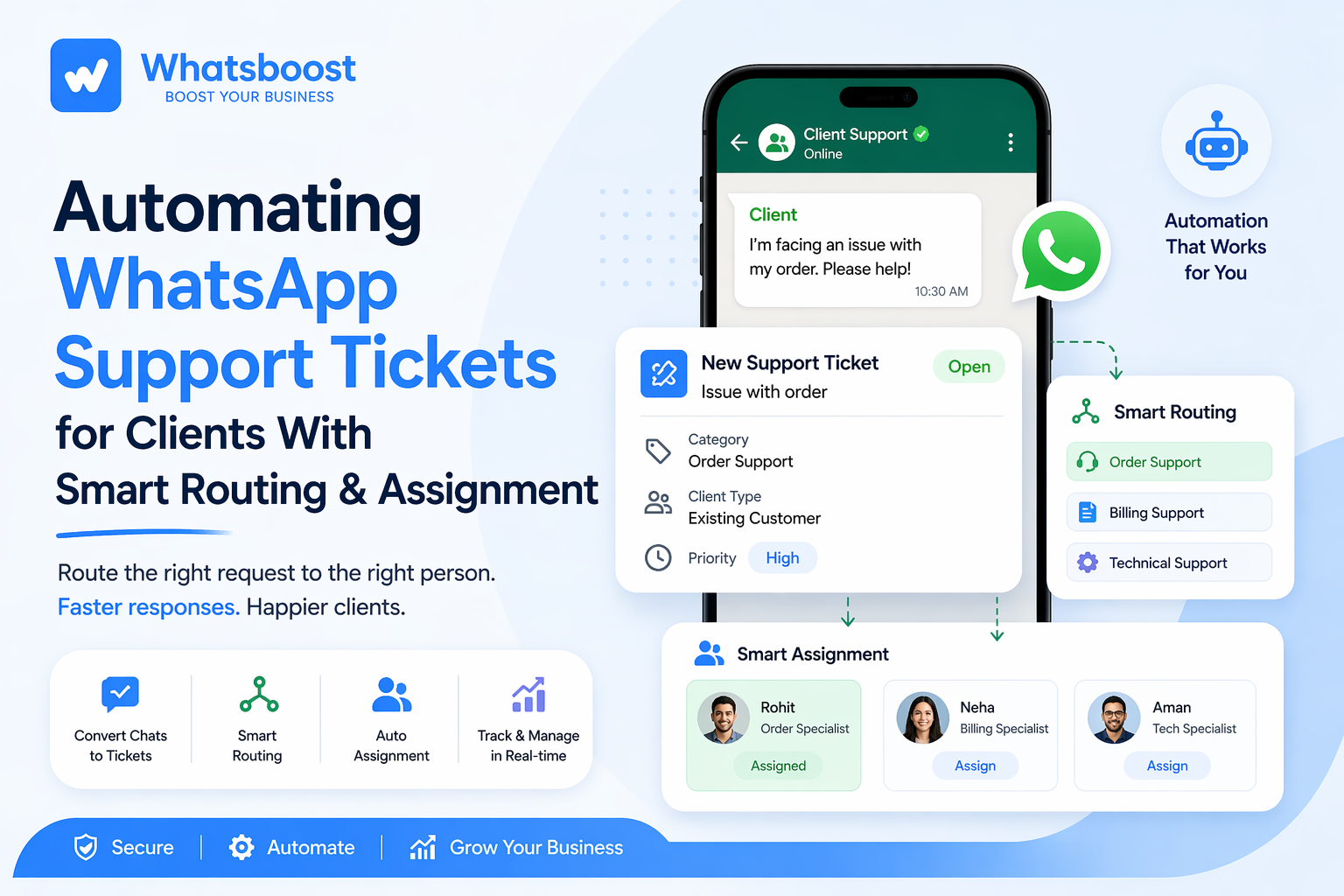
Automating WhatsApp Support Tickets for Clients With Smart Routing & Assignment
Managing client support on WhatsApp manually can slow your team down. Discover how smart routing and automated ticket assignment help businesses streamline support, reduce delays, and deliver faster, more organized responses at scale.
Handling client support on WhatsApp starts off simple.
A few messages, quick replies, maybe one team member managing everything.
But as soon as you scale — more clients, more requests, more urgency — things start breaking.
- Messages get missed
- Teams duplicate work
- Clients wait longer than expected
And the biggest issue? There's no system deciding who should handle what and when.
That's where automating WhatsApp support tickets with smart routing and assignment becomes a game-changer.
Why Manual WhatsApp Support Fails at Scale
Most agencies and service businesses rely on shared WhatsApp groups, personal numbers, and unstructured chat replies. Initially, it works. But over time, problems pile up:
- No prioritization of urgent requests
- No clear ownership of tasks
- No visibility into pending work
Even if you try to organize things manually, it quickly becomes inefficient — especially when handling multiple clients simultaneously. This is exactly the kind of operational chaos that agencies face when managing client requests across WhatsApp groups without a structured system behind them.
What Does "Automated WhatsApp Ticketing" Actually Mean?
It's not just about replying faster. It's about transforming WhatsApp into a structured support system where:
- Every client message becomes a ticket
- Tickets are automatically categorized, routed, and assigned
- Teams handle requests based on logic, not guesswork
This is where automation replaces chaos with predictable workflows.
The Core System: Smart Routing + Smart Assignment
Automation becomes powerful when two things work together:
1. Smart Routing — Sending Requests to the Right Team
Instead of manually forwarding messages:
- Billing queries → Finance team
- Ad campaign issues → Performance team
- Design requests → Creative team
Routing happens based on keywords, client type, or message intent. For example:
"Payment issue" → Automatically routed to billing support
This eliminates delays and reduces internal confusion.
2. Smart Assignment — Giving Ownership Instantly
Once routed, the next step is assignment. Instead of "Who will handle this?", the system decides:
- Which team member is available
- Who handled similar tasks earlier
- How to balance workload fairly
Now every ticket has an owner, accountability, and moves faster.
Real Workflow Example (Agency Use Case)
Let's say a client sends this message on WhatsApp:
"Our ads are not delivering since morning. Please check urgently."
Without Automation: Message seen late → forwarded manually → team confusion → delayed response.
With Smart Ticket Automation:
- Message converted into a ticket
- System detects "ads issue"
- Routed to the performance team
- Assigned to an available specialist
- Status updated automatically
Result: Faster resolution, zero confusion.
Why This Matters for Agencies & Service Teams
As your client base grows, support complexity increases. Without automation, support becomes reactive, teams feel overwhelmed, and clients lose trust.
The deeper issue is that most teams treat WhatsApp as just a chat tool, when it can function as a complete task management layer. This shift — from converting client chats into structured, trackable tasks — is what separates agencies that scale smoothly from those that stay stuck firefighting.
Going Beyond Tickets: Building a Full Support Engine
Smart agencies don't just "manage chats." They build systems where conversations trigger workflows, tasks are auto-created, and teams operate with clarity.
The most effective businesses connect their support system to a broader operational structure — one that links WhatsApp CRM, client onboarding, and project management into a single automated workflow. When these pieces connect, nothing falls through the cracks.
How Whatsboost Enables Smart Ticket Automation
To build this level of automation, you need more than WhatsApp — you need a system layer on top of it. With the right setup on Whatsboost, you can:
- Automatically convert messages into support tickets
- Route requests based on logic and intent
- Assign tickets without manual intervention
- Track status in real-time across teams
Instead of juggling chats, you're running a support workflow engine inside WhatsApp.
Connecting Automation with Real Use Cases
If you've already explored how structured messaging flows work in real operational setups — for example, how to automate WhatsApp messaging workflows for tuition classes — you'll notice a familiar pattern:
- Conversations → workflows
- Messages → actions
- Replies → outcomes
The same logic applies to support ticket automation, but with deeper control and scalability for client-facing service businesses.
The Impact: What Changes After Automation
Once smart routing and assignment are in place:
Faster Response Time — No more delays in forwarding or assigning.
Better Team Productivity — Everyone knows exactly what to handle.
Improved Client Experience — Clients get quicker, clearer responses.
Scalable Operations — Handle more clients without increasing chaos.
Common Mistakes to Avoid
Even with automation, many teams fail because:
- They don't define routing logic properly
- They assign everything to one team without load balancing
- They don't track ticket status after assignment
Automation only works when the system design is intentional — not just switched on and forgotten.
Final Thoughts
WhatsApp is already your primary client communication channel. But without structure, it becomes a bottleneck.
With smart routing and assignment, it becomes a scalable support system, a productivity engine, and a client retention tool. The difference is not the platform — it's how you build the workflow behind it.
Want to See Smart Ticket Automation in Action?
If you're serious about building a structured WhatsApp support system for your business, explore Whatsboost's automation features and see how it fits your workflow.
Or if you want a hands-on walkthrough with a real demo, book a live session with the Whatsboost team and see smart routing in action.
Want to automate WhatsApp for your business?
Set up campaigns, replies, and follow-ups in minutes.